Managing Presets
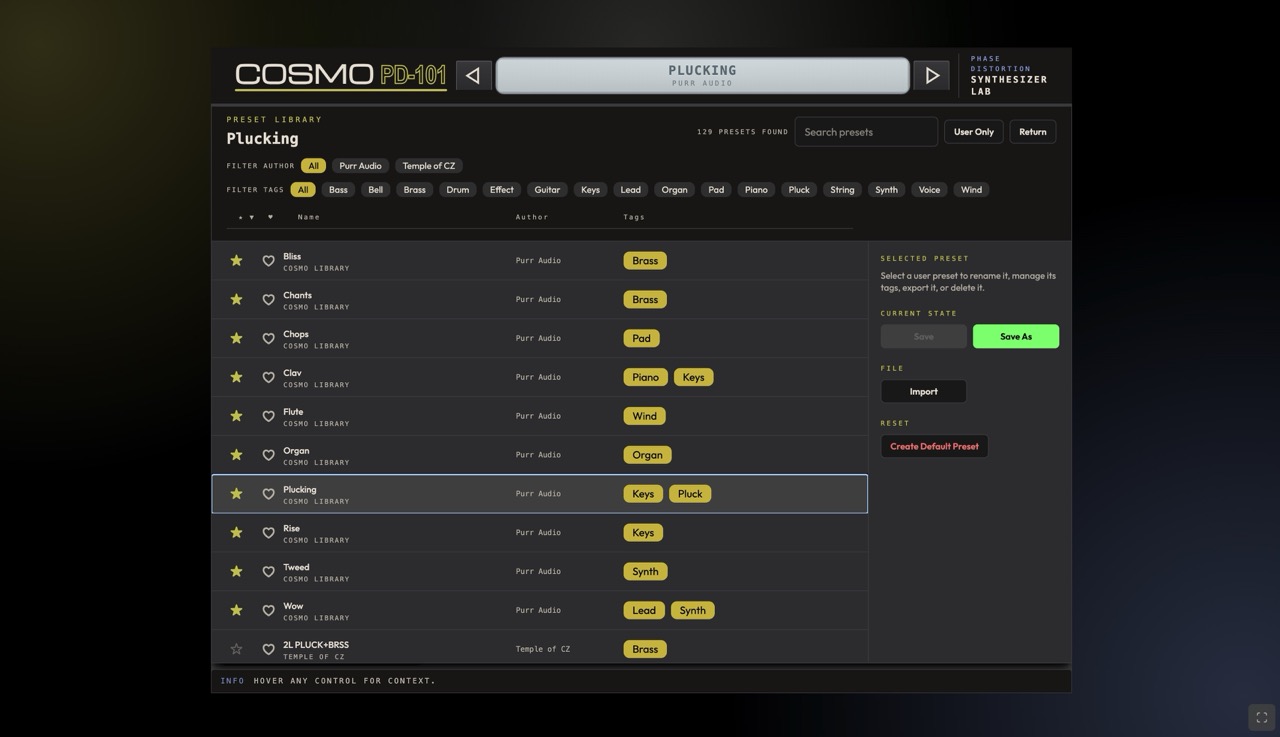
Where Presets Live
IndexedDB (web app) or local presets directory (desktop/plugin). Exportable as JSON.
Loading a Preset
- Click preset icon -> open library.
- Browse/search by name.
- Click a preset to load.
Saving a Preset
- Adjust controls. 2. Click "Save preset". 3. Enter name. 4. Optionally set author and tags.
Preset File Format
Versioned JSON schema (v1) with params for lineSelect, modMode, octave, volume, polyMode, portamento, line1, line2, modMatrix, fxSlots.
Importing/Exporting
Export as .json, import .json files. Portability across all platforms (Web, Desktop, Plugin).
Importing Casio CZ-101 SysEx
See SysEx Import/Export.
Organizing Presets
TIP
Use search, categories, tags, and favorites (star) to keep your preset library organized as it grows.
Factory Presets
Categories: Lead, Bass, Pad, FX.
Next: SysEx Import/Export | Previous: Effects
ON THIS PAGE